StyleSVG

SVG Converter

StyleSVG is an AI SVG converter for makers. Drop in a PNG, JPG or WEBP and get smooth, closed vector shapes you can cut, engrave or print at any size. Preview the result without signing up before you decide to download.

Made for

The traced result as it is. You can adjust everything afterwards.

Drop your image here

PNG, JPG, WEBP or GIF · up to 25 MB · one free preview a day, no signup

Signed in? Pick up to 20 images at once.

Choose image
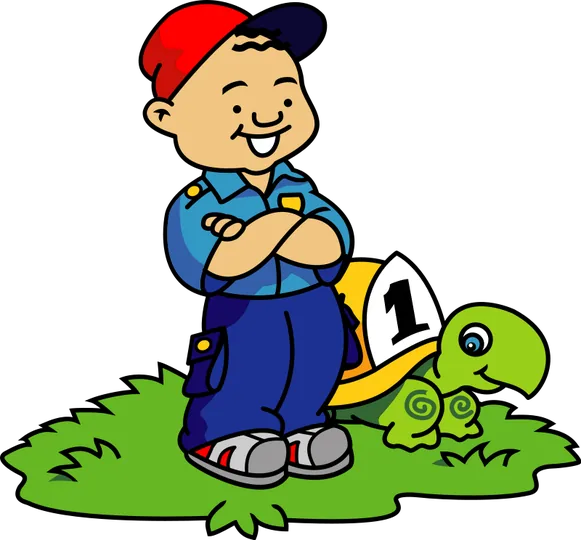
Cartoon boy leaning on a turtle, saved as a PNG raster image before conversion
Before: a PNG clip-art image made of pixels.
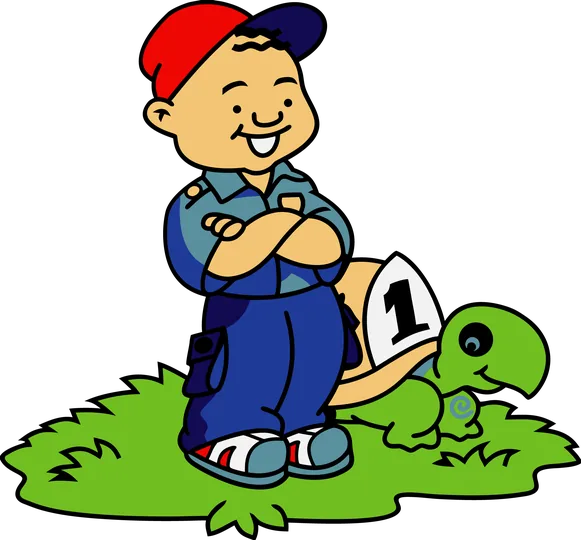
The same boy and turtle rebuilt as flat vector shapes in eight colour layers | SVG converter
After: eight flat colours on separate layers, ready for a cutting machine (Cricut preset).

What Is an SVG Converter?

An SVG converter reads the pixels of a raster image and redraws every edge as a mathematical path. The result is a vector file that stays sharp at any size and can be edited shape by shape.

Image to SVG, explained

Turning an image to SVG is called tracing. Our AI follows each outline, fills every region with a flat colour and closes the shape, so a logo, sticker or drawing becomes a set of clean curves instead of a grid of tiny squares. Because paths are stored as points rather than pixels, the same file works as a phone icon or a shop banner without going soft.

Picture to SVG is more than a new file extension

Renaming a file does not change what is inside it, and some online tools simply wrap the original bitmap in an SVG container. That kind of file still pixelates and cannot be cut. A real conversion rebuilds the artwork from scratch. StyleSVG never embeds your picture: the download holds vector paths only, which is exactly what cutting software and print shops expect.

Vectorize an image →

Photo to SVG: what to expect

Tracing works best on artwork with clear edges. A photograph becomes a stylised, poster-like image made of flat colour areas rather than a photographic copy. For product shots and portraits, switch on AI background removal and keep two to six colours; the result makes a striking decal or engraving. Upload the largest original you have, because missing detail cannot be invented.

Why Use Our SVG Converter?

Plenty of tools trace images. This one was designed around what makers do with the file afterwards: cutting, engraving, printing and editing.

Convert to SVG with colour, not just black and white

Many free tracers only return a one-colour silhouette. We keep the full palette, then let you tidy it up: reduce the artwork to anywhere from two to sixteen colours, swap one colour for another or delete a colour entirely. Every change re-renders on the preview within a second or two, and editing never costs anything extra.

JPG to SVG converter →

An SVG converter for Cricut, lasers and print

Choose a preset before you upload. Cricut / Silhouette removes the background, keeps up to eight colours and puts each colour on its own layer. Laser engraving reduces the image to two tones with closed outlines. Print keeps the original colours and gradients. Every preset is only a starting point, so you can change any setting afterwards.

PNG to EPS converter →

Clean files you can trust

Each result is cleaned before you see it: no scripts, no embedded bitmaps and no links to outside files. Turn on cutter-friendly mode to drop tiny specks, flatten gradients and close every sub-path. The same edited artwork can be downloaded as SVG, a transparent 2048 px PNG, a vector PDF or an EPS.

How to Use the SVG Converter in 3 Steps

With this SVG converter, most images are ready in five to twenty seconds. Photos with AI background removal take a little longer.

1

Upload a PNG, JPG or WEBP

Drag the file onto the box at the top of the page or tap Choose image. Files up to 25 MB are accepted, and very large images are scaled down in your browser before upload. Pick a preset if you already know where the file is going.

2

Check the preview and adjust it

A watermarked preview appears as soon as tracing finishes. Drag the slider to compare it with your original, zoom to 200%, then remove the background, cut down the colours or recolour shapes until it looks right. Undo and Original are always one click away.

3

Download your files

Sign in with Google and your first file is free. After that, unlock a single file for $6.99 or subscribe for a monthly allowance. Every unlocked file includes one free re-run in case you want to try a different source image.

See pricing →

What Can You Make with the SVG Converter?

From the craft room to the print shop, these are the jobs converted files most often end up in.

Logo to SVG for merch and signs

Clients often send a small logo saved from a website. The SVG converter redraws the letters and shapes so the logo prints crisply on T-shirts, mugs and shop signs, and you can match the colours to the brand guide before downloading.

PNG to SVG converter →

Stickers, decals and layered vinyl

Turn clip art or your own drawings into cut files. With layers switched on, each colour becomes a separate sheet of vinyl, stacked in the order that keeps the design intact, including small details such as eyes and outlines.

Web graphics and icons

Vector graphics stay small and razor-sharp on high-resolution screens. Convert an icon or illustration once and use the same file at every size on your website, in an app or in a slide deck.

WebP to SVG converter →

SVG Converter FAQ

Ready to turn your image into vectors?

Convert an image